Search results for tag #littlefedi
 littleFedi - Official Account »
@littlefedi_official@littleone.littlefedi.social
Another little step for #littleFedi!
As more people start testing and running littleFedi, bug reports, suggestions and ideas are becoming increasingly important. And keeping track of everything through Mastodon posts and private messages isn't exactly the best solution. :)
So, we now have a proper Issue Tracker!
https://issues.littlefedi.org/
Found a bug? Have an idea for a new feature? Think something could be improved, or that the documentation is missing something? This is the place.
You can register, check existing issues and open new ones.
littleFedi is still growing, and your feedback is helping us make it better, one small step at a time.
Thanks to everyone who's been testing, reporting, suggesting and, most importantly, giving this little project a chance.

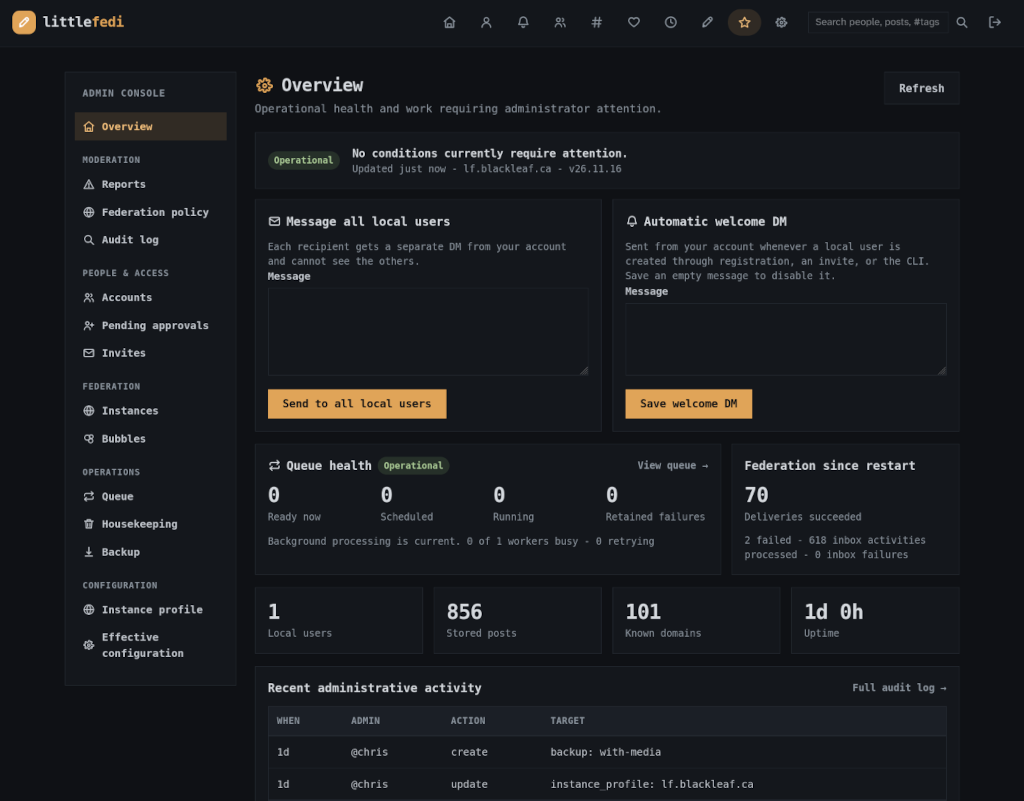
Stats after running/using #littlefedi for 24h hours.
Fun!
Alt...
Admin console screenshot from a littlefedi instance that has been running for 24 hours.
Take aways: all green;
Federation stats: 70 messages successful, 1 user (me!), 856 stored posts, 101 known domains, uptime of 1d 0h

Well, it should be ready (enough) for some issues/suggestions/bugs/etc.
Friends, could you please test it?
https://issues.littlefedi.org/
Thank you!
littleFedi: reverse proxy and split domains
littleFedi can use one domain for account handles and another for the server. For example:
@alice@example.comis the address people follow.https://social.example.comserves the web interface, API, media and ActivityPub objects.
You can keep your existing website on example.com. It only needs a rule that redirects WebFinger requests to the littleFedi domain.
Choose both domains before creating accounts. Changing them later changes the instance’s identity.
littleFedi configuration
In littlefedi.toml, with the reverse proxy running on the same machine:
local_domain = "example.com"
web_domain = "social.example.com"

[http]
listen = "127.0.0.1:8080"
proxy_uri = "https://social.example.com"
trusted_proxies = ["127.0.0.1/32"]
If you already have an [http] section, edit it rather than adding another.
Point the DNS records for social.example.com at the reverse proxy. The server hosting example.com must also serve HTTPS. A DNS alias alone does not replace the WebFinger redirect.
Expose ports 80 and 443 on the proxy and keep port 8080 private. If the proxy runs on another machine, use a private listener address and trust only the proxy’s address.
Caddy
Add this to your Caddyfile, replacing the example domains:
social.example.com {
    reverse_proxy 127.0.0.1:8080
}

example.com {
    redir /.well-known/webfinger https://social.example.com{uri} 302
}
Caddy handles certificates and the WebSocket connections used for streaming.
If example.com already has a site block, add only the redir line to that block and keep the existing website configuration.
Check the configuration before reloading Caddy:
caddy validate --config /etc/caddy/Caddyfile
nginx
This configuration belongs in nginx’s http context, usually through an included site file. Replace the domains and certificate paths with your own.
Install valid certificates and arrange automatic renewal before enabling the HTTPS servers.
map $http_upgrade $connection_upgrade {
    default upgrade;
    '' close;
}

server {
    listen 80;
    listen [::]:80;
    server_name example.com social.example.com;
    return 308 https://$host$request_uri;
}

server {
    listen 443 ssl;
    listen [::]:443 ssl;
    server_name social.example.com;

    ssl_certificate /etc/letsencrypt/live/social.example.com/fullchain.pem;
    ssl_certificate_key /etc/letsencrypt/live/social.example.com/privkey.pem;
    client_max_body_size 41m;

    location / {
        proxy_pass http://127.0.0.1:8080;
        proxy_http_version 1.1;
        proxy_set_header Host $host;
        proxy_set_header X-Forwarded-Host $host;
        proxy_set_header X-Forwarded-Proto $scheme;
        proxy_set_header X-Forwarded-For $remote_addr;
        proxy_set_header Upgrade $http_upgrade;
        proxy_set_header Connection $connection_upgrade;
        proxy_read_timeout 1h;
        proxy_buffering off;
    }
}

server {
    listen 443 ssl;
    listen [::]:443 ssl;
    server_name example.com;

    ssl_certificate /etc/letsencrypt/live/example.com/fullchain.pem;
    ssl_certificate_key /etc/letsencrypt/live/example.com/privkey.pem;

    location = /.well-known/webfinger {
        return 302 https://social.example.com$request_uri;
    }

    location / {
        return 404;
    }
}
If example.com already hosts a website, add only the WebFinger location to its existing HTTPS server block. Keep the website’s other rules instead of the return 404 shown above. If you already have the same map directive, do not add it twice.
Check the configuration before reloading nginx:
nginx -t
Check discovery
Use an existing local account, replacing alice with its username:
curl --fail -i 'https://example.com/.well-known/webfinger?resource=acct:alice@example.com'
The response should redirect to social.example.com, keeping the resource query parameter.
Then follow the redirect:
curl --fail -L 'https://example.com/.well-known/webfinger?resource=acct:alice@example.com'
The JSON should contain acct:alice@example.com as its subject, with an ActivityPub actor link at https://social.example.com/users/alice.
Finally, check a follow in both directions with another instance.
If account handles and the server use the same domain, only the reverse proxy is needed.
I'll probably configure a bugtracker for #littleFedi - collecting bugs, suggestions, etc. will be much easier. I was considering Roundup - what do you think?
Any suggestions?

Thinking about trying #LittleFedi but I'm not sure how it would fare on a larger fedi account. I have ~13k followers - has anyone with an account of a similar size been using it?
The Little Computer People Present littleFedi: Our First Public Release
"Hi,
We would like to show you a small project we've built and used over the last few years.
It's a Mastodon-like platform that federates using its own protocol and can work even without HTTPS or public Internet access. Many of us have restrictions on our communications, and this project has helped us stay in touch and have our own social network. We'd love to show it to you and hear what you think, because your OwnYourData message really resonates with us."
The Story
And this email sat ignored for weeks.
It came from an anonymous, generic mailbox, with an even more anonymous and suspicious subject. The spam filter had classified it as, well, spam, for other reasons too. Only when I checked the spam folder again, weeks later, did I move it to the Inbox. "Why not?", I thought. And I asked to see what they had built.
There was no way for me to connect to one of their instances. They trusted me and sent me the code which, although fragmented and loosely put together, compiled and ran natively on FreeBSD. But before that: "We only ask you to never say anything, at least until we're ready. We don't want to be visible and, inevitably, judged or attacked. We tried something else before and backed away. Our software isn't high quality and we know it. But it works, for us, and we have fun building it. When it works we're happy, shut away in our rooms, often in the middle of the night. Sometimes, joking, we say we're like little people living inside our computers and that, thanks to this software, we can talk to each other."
At that moment I smiled and thought of a 1985 video game, from my childhood, that was quite revolutionary at the time: "You're like Little Computer People". They liked it. And that's how the group got its name: the Little Computer People.
My first test went well. I was immediately struck by the lightweight interface. "We have old computers, slow hardware. It has to be light. It just has to!". Abundance led to waste. And yet I preferred that light interface, even if incomplete, to many of today's heavy social interfaces, commercial or not. But the code had gaps, pieces held together with duct tape, unfinished parts. They knew it, they had told me, and they were ashamed of it. "You should be proud of what you're doing. It's beautiful", I wrote to them. "We'll never release it."
The battle, if we can call it a battle, was a long one. They weren't far from making it ActivityPub compatible, and there was already a basic draft implementation (tested only with snac). "We don't want to show it, we don't feel up to it. We don't want to step on the toes of others like snac or GoToSocial, who have done a far better job than we have". I tried to convince them, also because the implementation was moving forward and the results were really encouraging. But no, they didn't feel ready. Until, luckily, one of them made a proposal: "We could release it... but we don't want to be seen. We want to stay in our computers and enjoy our code. We don't want to read praise, criticism or comments. We just want to have fun. Would you like to be one of the Little Computer People too? The human who talks to humans while we keep having fun?". I felt honoured and accepted. Explaining, among other things, that Open Source is not a battle. We are not in an arena, where the existence of one solution means crushing another.
This software is not a slight against Mastodon or snac or GoToSocial, but one more choice. Nobody gains. Nobody loses. It's there. It exists. It's something beautiful, one more thing in the world. They agreed, leaving the license undecided and keeping the strictest confidentiality.
The software had no name. But after we came up with the group's name, we affectionately called it our "little social". After the first real, complete ActivityPub federation (with proper tests), the current name was chosen among the alternatives: littleFedi.
"You have more experience... what should we implement?". I thought about it, looked at what was still "in the oven" and what I'd really like to have. I made a list, detailed and very long. But the most important part, for me, was blogging.
Then something happened, and development had to stop. Some devs could no longer work on it. Others weren't able to touch what the others had built. There was only one person who could carry on, albeit slowly, but their computer had broken and they could only communicate by smartphone. They couldn't buy another computer. And yet, a few days later, they received one. Ready to go. With FreeBSD inside.
littleFedi risked stopping right there, with part of the team still against any public release, at least at that point. But sometimes things work themselves out just when you least expect it, and in a short time the "little" humans were back in their computers, having fun, unwinding, creating something beautiful. Until a hot day this summer, when I asked their permission to make my first littleFedi instance public, running on my Raspberry Pi Zero W. One of them was against it at first. Then changed their mind. And I did it, announcing it to the world: https://rpi0w.stefanomarinelli.it/@stefano/blog/2026/07/01/littlefedi-light-yet-complete/
They don't want to interact with the world, but I still decided to show them the comments - all positive. That evening, the private test instance started showing (without me knowing) balloons and streamers every time we logged in. It was a party. And that made my next task easier, leading to the first public instance: littleOne
When I announced it, a lot of friends chose to join the test, and thanks to them a huge number of issues were found and fixed. A huge thank you to them. I acted as a bridge between them and the team, fixing and implementing what I could myself. I'm not primarily a dev but a system administrator, and I prefer not to touch what I don't know. The enthusiasm of the Little Computer People, though, was obvious even without them saying it: bugs were fixed in minutes, hours at most. We merged test branches quickly, so the friends on littleOne could try them.
Towards a Release
The last two months saw a lot of development, but mostly focused on reviewing and cleaning up the code. With one single goal: a first public release. The chosen license, after some thought, is MIT. The point is to give it to the world. This software was born from people who want to communicate with other people, and that's what matters. It's a means, not an end. Because those who don't have freedom dream of freedom without restraints.
There is much more documentation than what we're releasing today, along with tests and internal material that still needs to be reviewed. Some parts describe the project as it was designed, not necessarily as it was later implemented. Others haven't been checked enough yet to be published as reliable documentation. So we chose to release now what's ready: all the code needed to run littleFedi and enough documentation to get started. Not everything has been tested and certified in all the combinations we'd like, but what we're releasing is mature enough to be tried and used.
As of today, littleFedi is available from the downloads page at https://littlefedi.org. There won't be versioned releases for now, just snapshots of the code, both as source and as prebuilt binaries. What matters today is putting the tool in people's hands. Later, when things are ready enough, we'll probably move to good old git, on the BSD Cafe Forgejo. The sources already point there, but that project is currently private (and intentionally empty).
What Is littleFedi
So what exactly are we releasing today?
littleFedi starts from a very simple idea: owning your own social space shouldn't require complex infrastructure. In its basic form it's a single static binary, a configuration file, SQLite and your media on the filesystem. You copy it to a machine and start it. The minimum "certified" target today is my Raspberry Pi Zero W running NetBSD, powered over USB by my switch. It's designed for small, single-user instances, but also for larger ones, with the option to use S3 for media storage (the main space problem of single-user Mastodon instances) or PostgreSQL instead of the built-in SQLite. How large can an instance be, exactly? We don't know yet. The code is there, ready to be tested. We'll leave that for you to find out! You can also already migrate the storage (live), not the databases yet (but there's a partially implemented draft, so that will come too).
There are some rather unusual features, bringing together some of the nice ideas found in other implementations. It's written in Go, and Go allowed us to do something I care about a lot: FreeBSD, illumos, Linux, NetBSD and OpenBSD are not secondary ports of software designed only for Linux. Each one has its own operational documentation. It has a low power mode, lets you schedule a post or set, post by post, an expiration (propagated to other instances). It has a light and simple web interface, yet complete, with no frills, reasonably usable even without JavaScript. Care went into making the PWA pleasant and usable and, even with a few bugs left, it's in my opinion one of the best ways to use littleFedi. And, yes, if you don't want to use its web interface, littleFedi also speaks the Mastodon API: many existing clients can connect directly. It supports emoji reactions. It supports push notifications. Post visibility follows the usual Fediverse model, with two additional variants: Local and Local Unlisted. Because not every post we write needs to leave our instance. And, speaking of federation, it has a fairly clean approach: by default, it federates with everyone. But it also supports blocklists and allowlists. Yes, allowlists: you can choose a list of instances to federate with, and that's it. Only those. Activities to and from all the others will be silently dropped, to give you an experience tailored to your expectations. "Filter bubble?". If you want to call it that. I call it the freedom to decide who your instance talks to.
And there's no need to doom scroll for fear of missing something: timelines are chronological, yes. But there's an optional Catch-up for when you come back after a few hours or days. It lives on a separate page and never decides what shows up in your timeline. If it shows you something, it also tells you why.
But there are too many features to list here, it would become a boring list. The only way is... to try it. Worth mentioning, in my opinion, for how peculiar they are, are two main features: littleMesh and Blog.
littleMesh, Blog and OwnYourData
The first, littleMesh, is an alternative transport mode for federation. Remember the first email, when they talked about their own federation able to work even without public Internet? That idea didn't go away. It evolved into littleMesh. Two littleFedi instances can communicate even behind NAT or CGNAT, with no public address, DNS or inbound ports. All it takes is an external lighthouse. If you also want to talk to the traditional Fediverse, an HTTPS gateway comes into play. ActivityPub, though, stays ActivityPub.
The blog feature is something I had in mind for a long time, and many of the friends who tried it on littleOne loved it. I like how WordPress federates into the Fediverse, but it's a CMS that federates. I wanted something different: a Fediverse platform, with a decent editor, that generates a static site. Simple, BSSG style, but complete and "eternal". HTML files, no need for JavaScript or images. Text is text, and I've always wondered why extra computation should be needed to show…words. When I saw the first draft, I fell in love with it. And I know those sites will still be readable in 10, 20, 30 years. Even without littleFedi. Because social networks are, by nature, ephemeral, but our ideas and thoughts sometimes deserve to stay. And above all, you're not publishing the same thing twice. The post is the same one. It federates normally and, if you choose it as a blog post, littleFedi also generates a static version of it. There's no CMS to keep in sync with the social network.
But littleFedi doesn't want to cage you or hold you back. It supports account migration (to and from other instances), and it also lets you export a full archive with all your content, which can then be imported into another littleFedi instance. Sure, in that case domain and handle will change, but the content will stay, just at a different address. OwnYourData: it doesn't matter which drawer it's in, as long as it's your drawer. And, just like Mastodon, you can self destruct your instance: take it off the Fediverse, politely saying goodbye to the other instances and asking them to remove our keys and content from their databases. Because the Little Computer People don't want to make noise or bother anyone. They just want to communicate, and leave with a smile when it's time.
Ready?
In the last few weeks some friends have taken a look at the code and confirmed what we already knew. It may not be textbook code, but we're releasing it. There are well-engineered parts, others much less so, some to be reworked, many to be analysed, but it's a step. If we aimed for perfection we would never release, and promises are promises.
I'm ready. The Little Computer People are ready. And the code is there, for anyone who wants to try this new communication project. The roadmap is already full of nice things to do, and more will be added. We're not in a hurry, it's not a competition. We want to do things properly.
For your first instance, all you need is a computer and a reverse proxy. Download the source and build it, or grab the prebuilt binary from the downloads page:
./littlefedi init
./littlefedi --config littlefedi.toml
And you're ready to federate with the world.
Happy communicating, and use it well. We're going back into our computers.
Stefano - @stefano@bsd.cafe
RE: https://mastodon.bsd.cafe/@RootMoose/117621536307643158
I think federation is likely working correctly, just something weird about trying to follow people on mastodon servers.
If I follow someone on a mastodon server I get a "follow requested" after pressing "follow". But, then that person's feed starts showing up in my time line. And, my logs show a:
deliver to https://server/inbox: unexpected status 401
Following myself here does the same thing, and here I don't get any notification to allow the follow (I don't have that enabled).
If I follow someone on pixelfed.social (Pixelfed software) then it just works as expected.
So, dunno. I'll upgrade tomorrow and see what happens perhaps.
littleFedi - Official Account »
@littlefedi_official@littleone.littlefedi.social
A new build of littleFedi (2026.11.16) is out!
The Little Computer People have been busy, and we're happy to share a new release of littleFedi!
Before reading the long changelog, there's something important we'd like you to know about upgrading.
⚠️ Important: Upgrading littleFedi
This release includes database migrations that run automatically on the first startup. Some of them may take a while, especially on larger databases or slower hardware.
Please read these instructions carefully before upgrading.
-
Stop littleFedi and make a backup.
Back up your database, configuration, and media files. Remember to save any encryption keys stored in the service environment, too.
See
docs/backup-restore.mdfor backup and restore instructions. -
Replace the binary.
Download the new binary for your operating system, CPU architecture, and database/media backend. Replace the old binary and start littleFedi using your existing configuration.
No separate migration command is needed.
-
Allow the database migrations to finish.
littleFedi will automatically perform the necessary migrations on its first startup. One of these rebuilds SQLite indexes and may take considerable time on large databases, particularly when running from an SD card.
Make sure your service manager allows enough time for startup.
Do not stop or restart littleFedi while migrations are running.
-
Check that everything is ready.
Wait for startup to complete, then check the logs and the
/readyzendpoint before using your instance.Subsequent startups will skip migrations that have already completed.
Need to roll back?
Stop littleFedi and restore your pre-upgrade backup before starting the previous binary.
Never run an older binary against a migrated database.
What's new?
As with previous releases, many of the changes come directly from the people who make this project worthwhile: our friends on this instance, those who have started self-hosting littleFedi, and everyone who has taken the time to test, report bugs, suggest improvements, or review our code.
We've continued working on the things that matter to us: keeping littleFedi lightweight, efficient, reliable, and enjoyable to use, without unnecessary complexity.
And yes, we're still very much committed to making the Fediverse accessible even to the smallest computers!
Here's what's changed in this release:
Changelog
-
Account blocks now hide posts in profiles, search, threads, quotes and
streaming, and stop new follows, mentions, replies, favourites, reactions,
poll votes, boosts and direct messages in both directions. Blocked profiles
keep only the account's identity and block/report actions. Existing direct
conversations stay readable, and email and push notifications check for
blocks before sending. Other accounts on the same server remain reachable,
even when they share an inbox. Public posts remain available to anonymous
readers and other instances.
-
Static blog pages now leave out unlisted replies. Only replies with public
visibility are included. Rebuild existing blogs after upgrading to remove
unlisted replies from pages generated by earlier versions.
-
Content warnings now display apostrophes and other HTML entities correctly
in posts and notifications, instead of showing codes such as
'. -
Source builds now require Go 1.27.4. Updated the Go dependencies, bundled
Alpine.js and htmx, and the security tools used in CI. Rebuild existing
binaries to pick up the Go security fixes.
-
With
housekeeping.max_delete_per_run = 0, status pruning now keepsgoing in batches of 500 until no eligible posts remain. Previously, remote
pruning stopped after 500 posts and local pruning after 500 per account.
Positive limits still apply across local and remote posts. Failed deletions
are left for the next run rather than retried in a loop.
-
The inbox no longer fetches a key for an unknown actor's self-delete.
Requests with a Signature header are acknowledged with
202and droppedwhen the actor and deleted object are the same URI and the account is absent
locally. Domain blocks still apply; deletes of known accounts and posts
still need authentication.
-
Incoming HTTP signatures now have their timestamps and body digests checked
before fetching a public key or verifying the signature. Stale requests and
damaged bodies can be rejected without a network request.
-
Public instance counts on
/aboutand the v1/v2 instance APIs are cachedfor 30 seconds, instead of counting the database on every request. The
admin dashboard still reads fresh counts.
-
SQLite reply and quote indexes now leave out NULL entries. This reduces
their size and avoids a slow query plan when loading RSS feeds. Migration
007 rebuilds all four indexes at startup and can be slow on large databases,
especially on SD cards. Allow extra time for the first startup after
upgrading; later starts skip the migration.
-
The interface is now available in Catalan, thanks to Jolupa, who
translated it. It can be picked in the settings like the other languages,
and Catalan is also in the list of languages a post can be tagged with.
Strings added after the translation was made were filled in afterwards and
are the ones most worth a second look.
-
Boosts can be scheduled, to spread them out instead of filling followers'
timelines all at once. Hold the boost button for half a second, or open the
post, and pick a time under "Boost later". A quick press still boosts right
away. Scheduled boosts show up on the Scheduled page next to scheduled
posts and can be moved or cancelled there. If the post is deleted or
becomes impossible to boost before then, the boost is dropped. Mastodon
apps have no notion of a scheduled boost, so the API leaves them out.
-
Scheduled posts can now be edited, not just moved to another time. The
Edit button on the Scheduled page opens the post in the composer with
everything it had, including the time, and saving puts it back on the
schedule. Before, the only way was to cancel it and write it again. A post
that is already being published can no longer be edited.
-
Posts can be saved as drafts. The composer has a "Save draft" button next
to Post, and the new Drafts page lists them, newest first. Opening one
brings back the text, content warning, audience, language, attachments,
poll and expiry, and the post it replies to or quotes. Posting or
scheduling a draft removes it. Everything is a plain form, so it works
without JavaScript and in text browsers. Drafts live on the server and are
not shared with Mastodon apps, which have no API for them.
-
The image viewer can now move between the pictures of a post. Use the
arrows on screen, the left and right keys, or swipe on a phone. Before, each
picture had to be closed and the next one opened by hand. Without
JavaScript nothing changes: each picture still opens on its own.
-
In French the image viewer had no name for screen readers. The apostrophe
in "Visionneuse d'images" broke the expression that sets it. Translated
labels are now read from data attributes, so quotes in a translation can no
longer break the script.
-
The Roost theme works better on phones. Post actions fit on one row, the
back link is a flat row instead of a pill against the screen edge, the
profile banner and avatar no longer fill the first screen, and the bottom
bar marks the current page without a filled block.
-
Unread mentions and direct messages now stand out from the other unread
notifications. In Roost the mention colour was the same blue as the unread
mark, and in every theme their rows took the same background as any unread
row. Herd and Ink also get mention colours further from their accent.
-
Filters set to warn now work on the catch-up page. The filtered posts were
shown in full, without the filter notice. Filters set to hide already
worked there.
-
Direct message notifications have a magenta edge, an envelope icon and their
own label, so they stand apart from public mentions.
-
Boosts from a followed account can now be hidden from the home timeline,
with the "Hide boosts" button on their profile or the matching switch in
Mastodon clients. Their own posts still show up. Boosts already in the
timeline go away too, and come back if boosts are shown again. The
reblogsparameter of the follow API was accepted but ignored until now. -
Push delivery now follows up to three 307/308 redirects within the same
HTTPS origin. The Mastodon app relay redirects endpoints without a trailing
slash; those pushes previously failed after all retries.
-
Pushes for favourites, boosts and federated mentions now carry
notification_id. Those jobs were built before the notification was stored,so the ID was missing, and the official iOS app showed only the relay's
placeholder trumpet instead of the notification.
-
The bookmark button on boosted posts now stays in sync after refreshing
the home timeline. Before, it could appear inactive while the post was still
bookmarked, and clicking it again removed the bookmark.
-
Replies no longer show the previous post as unavailable after it has been
downloaded. Refreshing or reopening the reply now keeps the correct reply
target in timelines, boosted posts and Mastodon clients. The open thread
page also updates its reply label as earlier posts arrive.
-
Redrew the quote icon. The old one, two squared-off hooks side by side,
could be read as "SS". It now looks like a pair of quotation marks.
-
Logging in with toot from the command line now works. toot opens
/oauth/authorize/with a trailing slash, which returned 404. URLs with atrailing slash are now routed like the ones without, as on Mastodon.
-
With
require_approvalon, new accounts were created already approved: theycould sign in at once and never showed up in the approval queue. They now
wait for an administrator. Accounts registered while the bug was present
stay approved; check recent signups if the setting is on.
-
Filter keywords created from a Mastodon client with
whole_wordturned offwere saved with it on. Leaving
whole_wordout still means on, as inMastodon.
-
Mastodon apps no longer show littleFedi's own notification types (follow
accepted, unfollows, blocks, emoji reactions, blog rebuilds and others) as
broken entries, and their unread badge no longer counts them. A client can
still ask for them with
types[], which the notification endpoints nowhonour.
exclude_types[]=pleroma:emoji_reactionnow works too. -
The
user:notificationstream carries only notifications. Before, it alsosent home timeline posts, which some clients (Tuba) showed as empty
notifications.
-
The instance documents report
image_matrix_limitas a pixel count, takenfrom
max_image_pixelsandmax_image_dimension. It was 4096, which clientsread as 4096 pixels in total and used to shrink uploads to a thumbnail. The
video limits Mastodon's iOS app requires are there too.
-
New client API endpoints:
GET /api/v1/accounts?id[]=,
/api/v1/accounts/lookup,/api/v1/accounts/familiar_followersand
/api/v1/notifications/policy. Mastodon for iOS and Tuba call them. -
Push notifications now reach the Mastodon apps (Mastodon for Android and
iOS, Tusky, Ice Cubes, Ivory, Mona). Apps that don't ask for
standard: trueget the olderaesgcmencoding, which is the only oneseveral of them can decrypt, and every push now carries the access token
and a numeric notification ID, without which the apps drop it. Form encoded
subscriptions are accepted, and the subscription ID is a number as the apps
expect. Subscriptions made before this release keep the old behaviour:
turn notifications off and on again in the app, or sign in again.
-
Polls no longer break Mastodon for iOS and Android.
own_votesandemojisare always lists, and
expires_atuses Mastodon's date format. -
Deleting a post from an app returns the deleted post with its source
text,so "delete and redraft" keeps the text. Deleting it twice returns 404.
-
Timeline paging:
min_idreturns the page right after the cursor instead ofjumping to the newest posts, which made apps skip everything in between when
filling a gap. A cursor pointing at a deleted post keeps working, and an
unknown
max_idreturns an empty page instead of the top of the timeline.
min_idandsince_idwork for notifications too. -
Linkheaders are now absolute URLs and keep the other query parameters.Followers, following, blocks, mutes, favourites, bookmarks, lists and list
members send them too, so apps can load more than the first page.
-
Media sizes are reported under
meta.originalas well, and remote mediakeep their blurhash and size. Apps used them to lay out images before they
load.
-
Accounts without an avatar or header point to a placeholder image instead of
an address that returned 404. Accounts also report
uriand
hide_collections, and relationshipsrequested_byandlanguages. -
The default post visibility and language set in the profile are reported to
apps and used when an app leaves them out.
-
/api/v2/instancereports the VAPID key underconfiguration.vapidand
translation.enabled. Mastodon for iOS reads both. -
Loading images, avatars and emoji no longer counts against the rate limit.
Scrolling a busy timeline could hit it, and every API call after that failed.
An API request over the limit now gets a JSON error with
Retry-After, andunknown API routes return JSON 404 and 405 errors instead of HTML.
-
littleFedi now logs a warning when requests come from a local reverse proxy
that is not listed in
http.trusted_proxies. In that case every visitorshares the proxy's rate limit.
-
CORS preflight allows the headers the browser asks for (
Idempotency-Keyamong them) and exposes
LinkandRetry-Afterto web clients. -
Idempotency-Keyis honoured when posting: a retried request returns thepost created the first time instead of a duplicate.
-
Tokens from
client_credentials(the app's own token, before a user signsin) are treated as anonymous on public endpoints instead of being refused.
-
Filters:
keywords_attributesworks when creating and editing a filter, inJSON and form encoding, and the
/api/v2/filters/:id/keywordsand
/api/v2/filters/keywords/:idendpoints are new. -
New endpoints:
GET /api/v1/accounts/search,
/api/v1/statuses/:id/history,/api/v1/timelines/directand
/api/v2/notifications/unread_count. -
The streaming API accepts the token in
Sec-WebSocket-Protocol, as theMastodon web client sends it, and tokens limited to
read:statusesand
read:notifications. -
The "Clear all" button on the notifications page is now called "Delete
all", in every language, since that is what it does.
-
Profile fields: up to four label and value rows on your profile, edited in
Settings or from any Mastodon app, and shown under the bio on the profile
page. They are sent to other servers like Mastodon's, and the ones remote
accounts publish are now shown on their profiles. Remote accounts already
known get theirs the next time their profile is fetched again. Links work;
verified_atis always empty, as littleFedi does not checkrel="me"links.
-
Apps can mute a conversation (
POST /api/v1/statuses/:id/muteand
/unmute). Mentions, likes, boosts, quotes, edits and reactions in thatthread stop notifying you.
-
Apps can keep a private note on an account
(
POST /api/v1/accounts/:id/note). Only you see it. -
Followers can be removed from an app
(
POST /api/v1/accounts/:id/remove_from_followers). A remote follower'sserver gets a Reject of the follow, as from Mastodon.
-
Conversations can be removed from the list from an app
(
DELETE /api/v1/conversations/:id); a new message brings them back.
POST /api/v1/conversations/:id/readworks too. -
Saving the profile from an app with an empty bio or display name now clears
it. Before, empty values were ignored and the old text stayed. The default
post visibility and language set in an app are saved too.
-
MastoBlaster could not read its push subscription: the
alertsobject hadno
updatekey. It is now there, and apps can turn on pushes for editedposts. Renaming a list and changing push alerts from MastoBlaster failed
with 405, because it sends
PATCH; both endpoints now takePATCHas wellas
PUT, like Mastodon. -
Three database migrations run at startup. One adds the
standardand
access_tokencolumns topush_subscriptions. One adds
accounts.fields_jsonand thethread_mutes,account_notesand
hidden_conversationstables. The last adds
push_subscriptions.notify_update. All of them only add, nothing existingis changed, and all can be rolled back.
A big thank you to everyone who has been following this little adventure, testing new builds, sharing feedback, and helping us improve.
littleFedi is still a young project, and there's plenty more to do. But every release brings us a little closer to what we've wanted from the beginning: a federated social platform that's simple to run, easy to maintain, and doesn't require a powerful server just to participate in the Fediverse.
Small computers deserve a place in the Fediverse, too. ❤️
Happy upgrading, happy self-hosting, and stay tuned!
The Little Computer People
#littleFedi #Fediverse #SelfHosting #OpenSource #OwnYourData
Finally got around to getting littleFedi up and running. Pretty darn neat! I was expecting something pretty stripped back considering it sells itself as a minimal experience using minimal resources. There's lots to play with here! It seems pretty polished so far also. I doubt I'll miss anything compared to a Mastodon host.
The federation says it's working but does not seem to be reaching out or more likely getting responses. Guessing because the dns records are too young. It'll probably get better over the next hour or so. I should go look at logs.
Anyway, I'll be splitting this account to move my arts interests to the new lf hosted account. My computer geek self will still be active here. Unless our barista, Stefano, says he's tired of me talking about Linux and shows me the door. Ha!
Fun!
Software:: littleFedi/26.11.16 (+https://littleone.littlefedi.social)
The date is in the future. That can only mean one thing: tomorrow is release day!

RE: https://littleone.littlefedi.social/@stefano/01a1e02e-ddea-7f6f-80a8-b4d502d09bb9
Your own Fediverse instance. Plug and play.
Stay tuned!
The #littleFedi devs are working on the code, but I'm working on the systems. I'm mostly a sysadmin, not a coder.
So here's a sneak peek at what's happening on a cold Sunday evening:
 * Starting littlebox-button ... [ ok ]
 * Starting littlebox-online ... [ ok ]
 * Starting littlebox-setup ... [ ok ]
littleBox Panel up: port 8081.
 * ERROR: littlefedi failed to start
 * Starting littlebox-usb ... [ ok ]
wlan0: interface state UNINITIALIZED->ENABLED
wlan0: AP-ENABLED
Setup: littleBox-806095, http://192.168.44.1:8081
It's running Alpine Linux on a Raspberry Pi Zero 2 W. Yes, THAT Raspberry Pi.
Alpine Linux is a perfect fit. But one of the next steps will be to bring all this to NetBSD, on supported hardware.
Your own Fediverse instance. Plug and play.
Stay tuned!
littleBox 2.0!
#littleFedi #littleBox #3DPrinting
Alt...
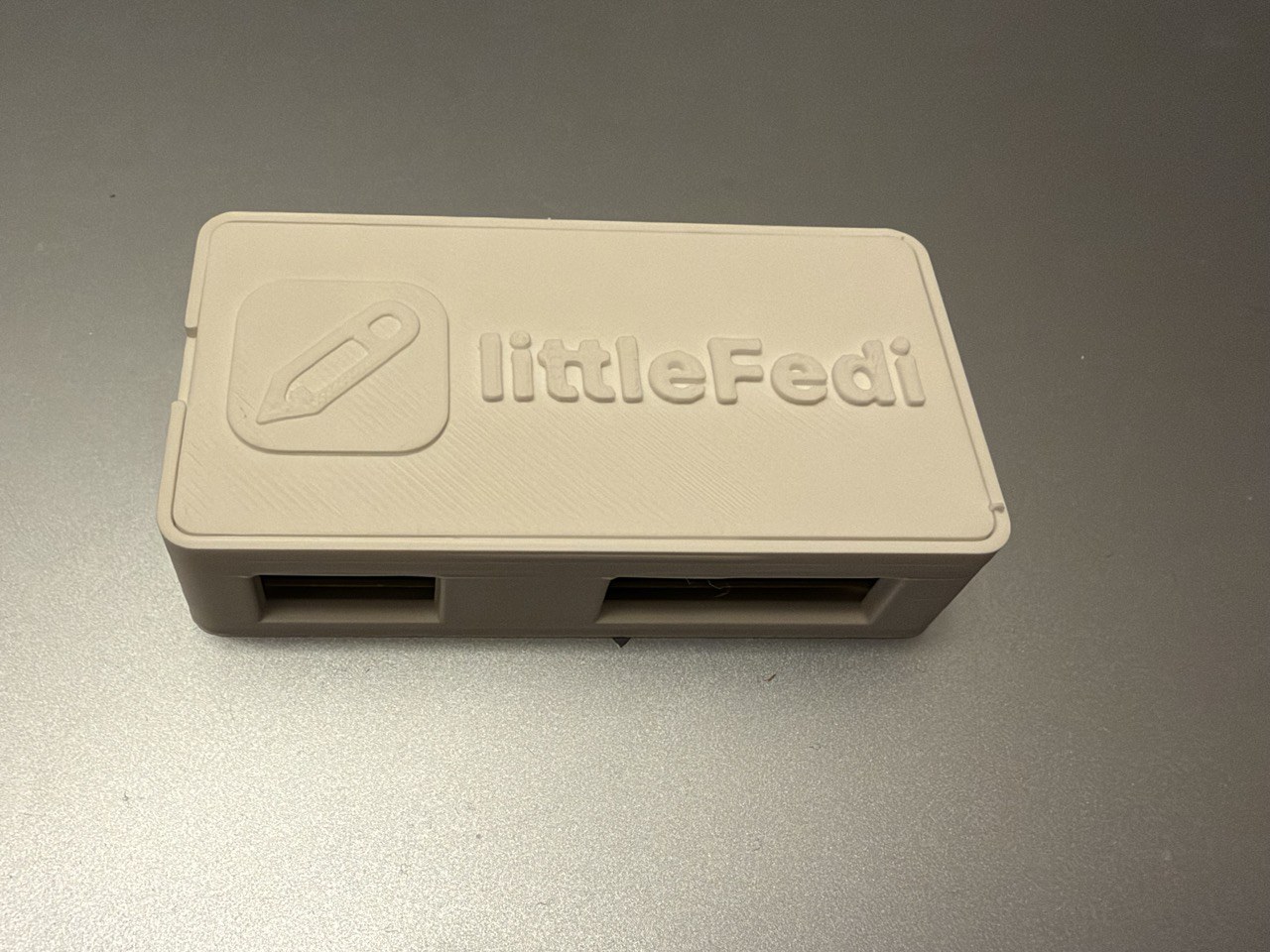
A Raspberry Pi Zero W inside a custom 3D-printed beige case, featuring a raised littleFedi logo and pencil icon on the lid. The case has rounded corners, a fitted removable cover, and two rectangular openings for the Raspberry Pi’s ports. It rests on a gray desk, with the 3D printing layer lines subtly visible on its surface.
Experimenting on a Friday night
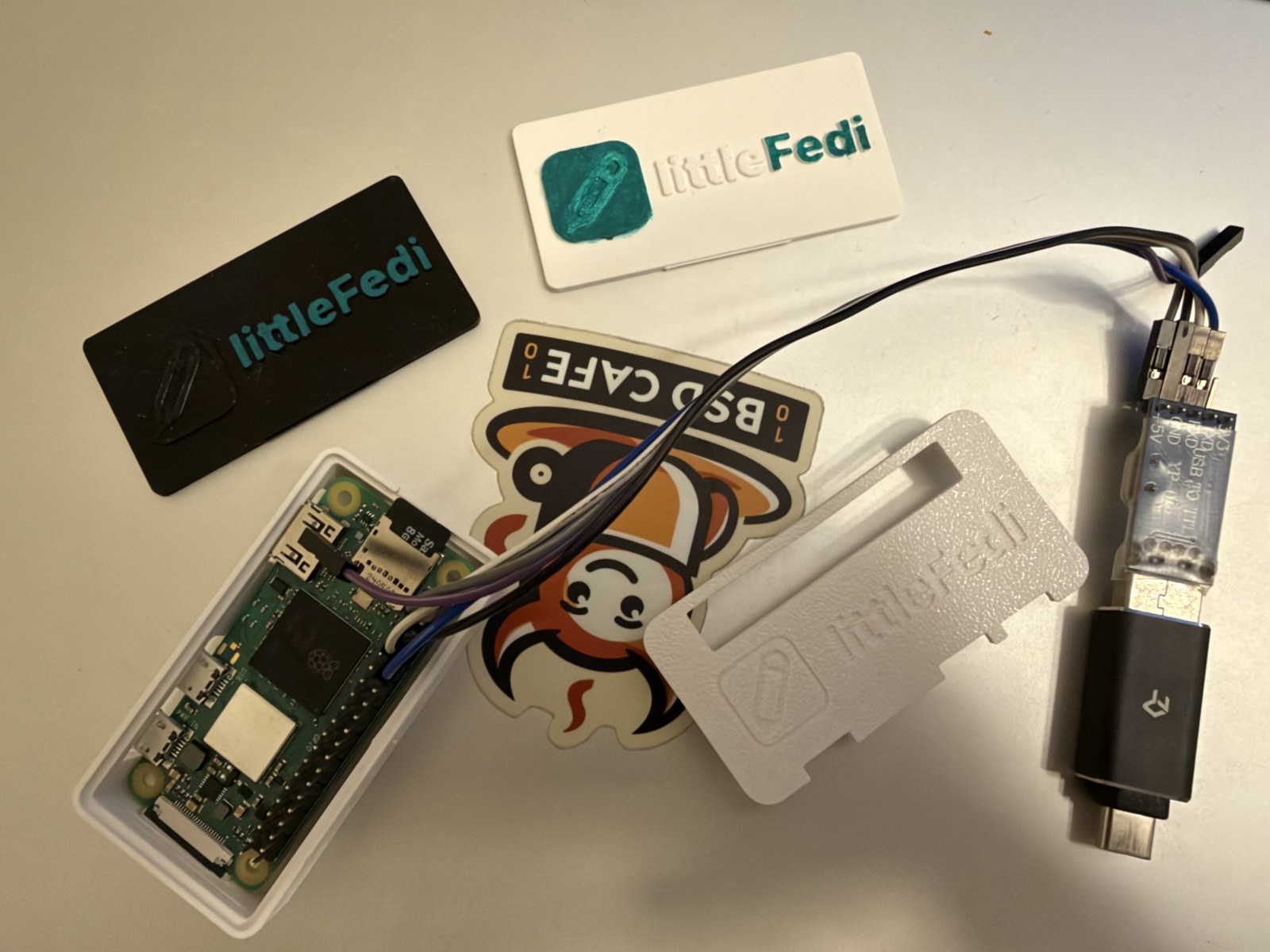
Alt...
A Raspberry Pi Zero in an open white 3D-printed case, connected via GPIO wires to a USB serial adapter. The components rest on a desk alongside custom littleFedi-branded 3D-printed covers and a BSD Cafe sticker featuring its cartoon mascot.
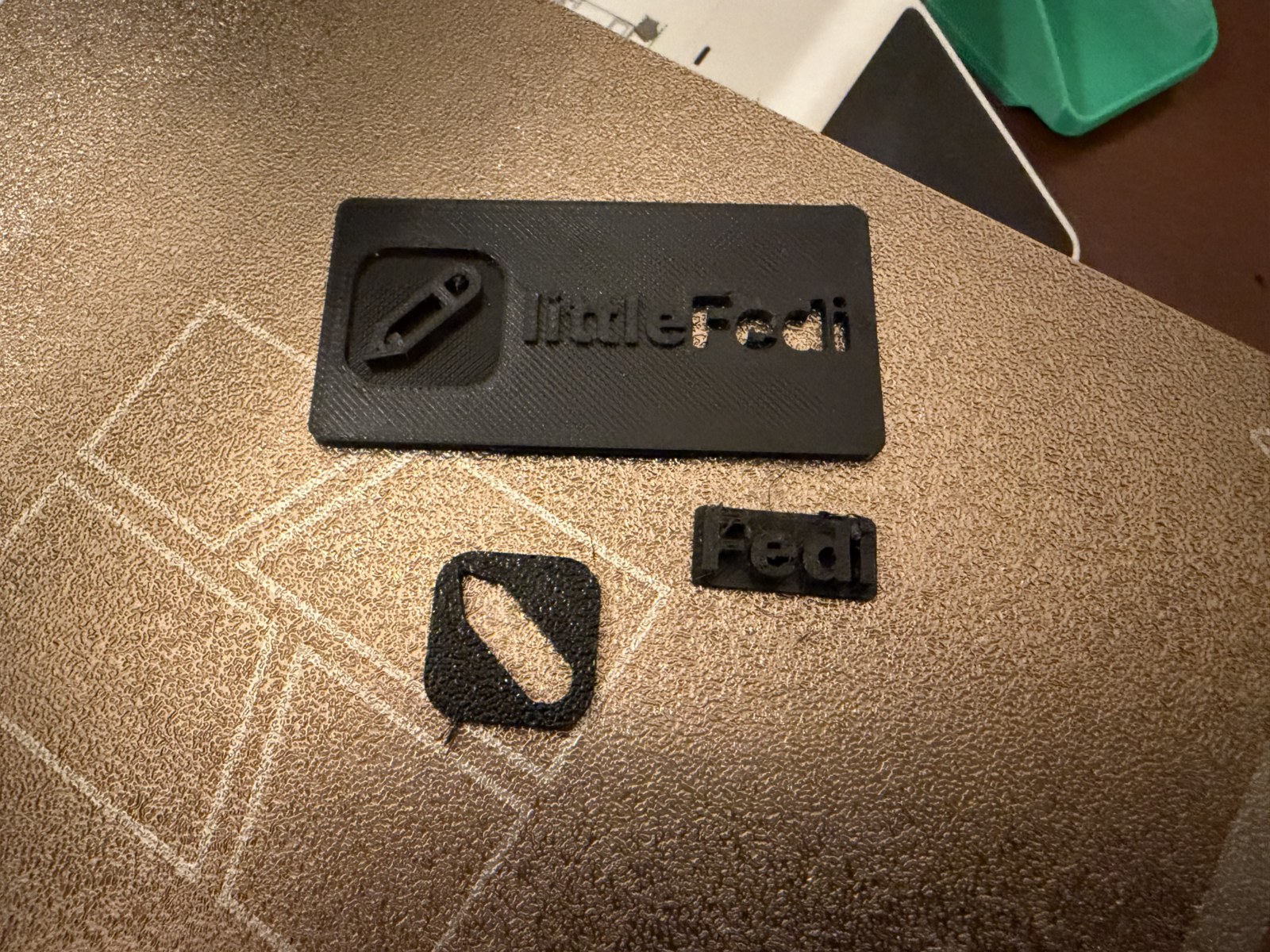
Alt...
A black 3D-printed littleFedi logo plate resting on a textured gold-colored surface, with separate cutout pieces for the icon and “Fedi” lettering placed below it. The visible layer lines and rough edges highlight the 3D-printing process.
The new build of littleFedi will require some fairly intensive database migrations to optimise database performance.
So, it's a good idea to take a backup beforehand and be prepared for a wait, depending on the size of your database and the speed of your system.
littleOne took about two and a half minutes.
I've just updated #littleOne with a new #littleFedi build. I'd like to give it some testing here before making a public release.
Quite a few things have changed since the October 13 release. These are the ones I'd like you to try:
- Drafts. You can now save a post and come back to it from the new Drafts page. Attachments, polls, content warnings and the rest should come back with it. Drafts are stored on the server, so you can continue from another device.
- Editing scheduled posts. You can now change their content, not just their publication time.
- Scheduled boosts. Hold the boost button for half a second, or open the post and choose "Boost later". You can move or cancel them from the Scheduled page. A quick press still boosts immediately. Drafts and scheduled boosts are available in the web interface.
- Hide boosts. There is now a "Hide boosts" button on the profiles of people you follow. Their own posts will still appear. The equivalent setting in Mastodon apps works too.
- Profile fields. You can add up to four fields from Settings or a Mastodon app. Fields from remote profiles are now displayed too. Link verification is not implemented yet.
- Images and phones. The image viewer now has arrows, keyboard navigation and swipe gestures to move through a post's pictures. Roost also has several layout improvements on small screens.
- Notifications and filters. Direct messages are easier to distinguish from public mentions, and unread mentions and DMs stand out more. Filters set to warn now work on the catch-up page too.
- Mastodon apps. There are fixes for push notifications, polls, image uploads, timeline gaps, paging and notification lists. Please try your usual app. If push notifications still don't arrive, turn them off and on again in the app, or sign out and back in.
- More account controls in apps. Conversation mutes, private account notes and removing followers are now supported.
- Catalan. Thanks to Jolupa, littleFedi now speaks Catalan. Please report anything that reads strangely, especially in the newer features.
There are also fixes for reply context and bookmarks on boosted posts.
Please use it as usual and let me know what breaks. If something looks wrong, tell me which app or browser you used and what you were doing. Thanks for helping me test it!
🍌 My instance is running on my banana.
Yes, you read that right. 😏
As ridiculous as it sounds, it's actually true: this very instance is running on an 11-year-old Banana Pro.
And it's running beautifully!
The littleFedi experiments continue!
PSST! While Microsoft is down, have you also seen you can now add some Profile fields in your littleOne profile?
Soon on all the littleFedi instances!
Cool: the Mastodon app is now working with littleFedi.
Not my first choice, but a step ahead!
All the enhancements will be a part of the next build.
I've just installed a new #littleFedi build on #littleOne
I've merged some bug fixes and, mainly, a series of fixes for third party Mastodon apps.
Please, test them if you can, this would help as I hope we've ironed out a lot of incompatibilities.
A new #littleFedi build should be ready in the coming days and probably be released shortly after.
Stay tuned!